Switching Between Pixels and mm
The dimensions of displayed image objects can be displayed either in pixels or in millimetres (mm).- When dimensions are displayed in mm, you will
see a button like:
 in the top left of
some windows.
in the top left of
some windows.
- When dimensions are displayed in pixels, you will
see a button like:
 in the top left of
some windows.
in the top left of
some windows.
Coordinate System
The coordinate system when image dimensions are shown in pixels is:
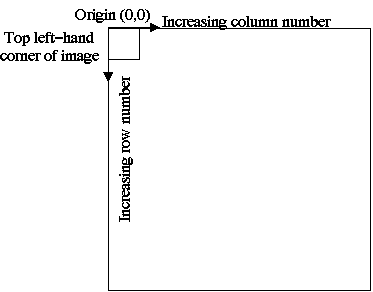
The coordinate system when image dimensions are shown in millimetres is:
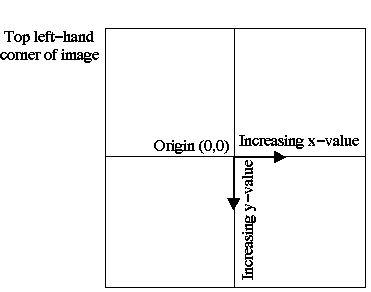
Dimension Display
As you move the mouse over the image, the dimension display towards the bottom of the display window will show the position of the cursor, and the image intensity under the cursor.
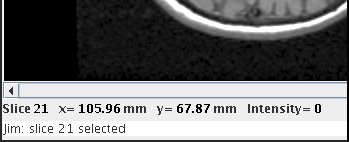
The things shown in the dimension display are:
- The slice number under the mouse. Slices are numbered from 1 to the number of slices in the data-set.
- The x- and y-coordinates of the cursor relative to the image slice. This can be either in pixels or mm.
- The image intensity under the mouse.
0.299 Red + 0.587 Green + 0.114 Blue
Red, Green and
Blue are the red green and blue gun values.
Note: when the displayed image is a complex image, the intensity displayed depends on the complex display mode.
If a movie is running, then the image intensity is continuously updated as the movie steps through the frames.
Storage of Dimensions
Whenever image dimensions are saved to disk (for example, as part of the definition of a Region of Interest, the coordinates of the outline are stored), they are stored in mm rather than pixels. This ensures that if these dimensions are loaded into other images (for example, when a Region of Interest is loaded into another image), the dimensions are independent of the pixel size and field of view in the two images.Note: it is assumed that pixel sizes are specified in millimetres in the image files.